
Job posting (JobPosting) structured data for Job Search
You can improve the job seeking experience by adding JobPosting structured data to your job posting web pages. Adding structured data makes your job postings eligible to appear in a special user experience in Google Search results. You can also integrate with Google by using a third party job site.

For employers and job content site owners, this feature brings many benefits:
- More interactive results: Your postings can be eligible to be displayed in the job search experience on Google, featuring your logo, reviews, ratings, and job details.
- More, motivated applicants: The new user experience enables job seekers to filter by various criteria like location or job title, meaning you're more likely to attract applicants who are looking exactly for that job.
- Increased chances of discovery and conversion: Job seekers will have a new avenue to interact with your postings and click through to your site.
How to add structured data
Structured data is a standardized format for providing information about a page and classifying the page content. If you're new to structured data, you can learn more about how structured data works.
Here's an overview of how to build, test, and release structured data.
- Ensure that Googlebot can crawl your site efficiently.
- If you have several copies of the same job posting on your site hosted under different URLs, use canonical URLs on each copy of the page.
- Add the required and recommended properties. Based on the format you're using, learn where to insert structured data on the page. Using a CMS? It may be easier to use a plugin that's integrated into your CMS. Using JavaScript? Learn how to generate structured data with JavaScript.
- Follow the technical guidelines and job posting content policies.
- Validate your code using the Rich Results Test. You can also preview how your structured data may look on Google Search.
- Deploy a few pages that include your structured data and use the URL Inspection tool to test how Google sees the page. Be sure that your page is accessible to Google and not blocked by a robots.txt file, the noindex tag, or login requirements. If the page looks okay, you can ask Google to recrawl your URLs. Note: Allow time for re-crawling and re-indexing. Remember that it may take several days after publishing a page for Google to find and crawl it.
- Keep Google informed by using the Indexing API and submitting a sitemap. For job posting URLs, we recommend using the Indexing API instead of sitemaps because the Indexing API prompts Googlebot to crawl your page sooner. Use the Indexing API to notify Google of a new URL to crawl or that content at a URL has been updated.
However, we still recommend submitting a sitemap for coverage of your entire site. We ingest the entire sitemap and recrawl the pages with lastmod times that are more recent than the last time those pages were crawled.
Examples
Standard job posting
Here's an example of an individual job posting using JSON-LD code.
<html> <head> <title>Software Engineer</title> <script type="application/ld+json"> { "@context" : "https://schema.org/", "@type" : "JobPosting", "title" : "Software Engineer", "description" : "<p>Google aspires to be an organization that reflects the globally diverse audience that our products and technology serve. We believe that in addition to hiring the best talent, a diversity of perspectives, ideas and cultures leads to the creation of better products and services.</p>", "identifier": { "@type": "PropertyValue", "name": "Google", "value": "1234567" }, "datePosted" : "2024-01-18", "validThrough" : "2024-03-18T00:00", "employmentType" : "CONTRACTOR", "hiringOrganization" : { "@type" : "Organization", "name" : "Google", "sameAs" : "https://www.google.com", "logo" : "https://www.example.com/images/logo.png" }, "jobLocation": { "@type": "Place", "address": { "@type": "PostalAddress", "streetAddress": "1600 Amphitheatre Pkwy", "addressLocality": "Mountain View", "addressRegion": "CA", "postalCode": "94043", "addressCountry": "US" } }, "baseSalary": { "@type": "MonetaryAmount", "currency": "USD", "value": { "@type": "QuantitativeValue", "value": 40.00, "unitText": "HOUR" } } } </script> </head> <body> </body> </html> <html> <head> <title>Software Engineer</title> <script type="application/ld+json"> { "@context" : "https://schema.org/", "@type" : "JobPosting", "title" : "Software Engineer", "description" : "<p>Google aspires to be an organization that reflects the globally diverse audience that our products and technology serve. We believe that in addition to hiring the best talent, a diversity of perspectives, ideas and cultures leads to the creation of better products and services.</p>", "identifier": { "@type": "PropertyValue", "name": "Google", "value": "1234567" }, "datePosted" : "2024-01-18", "validThrough" : "2024-03-18T00:00", "employmentType" : "CONTRACTOR", "hiringOrganization" : { "@type" : "Organization", "name" : "Google", "sameAs" : "https://www.google.com", "logo" : "https://www.example.com/images/logo.png" }, "jobLocation": { "@type": "Place", "address": { "@type": "PostalAddress", "streetAddress": "1600 Amphitheatre Pkwy", "addressLocality": "Mountain View", "addressRegion": "CA", "postalCode": "94043", "addressCountry": "US" } }, "baseSalary": { "@type": "MonetaryAmount", "currency": "USD", "value": { "@type": "QuantitativeValue", "value": 40.00, "unitText": "HOUR" } } } </script> </head> <body> </body> </html>Work from home job posting
Here's an example of a Work from home job posting using JSON-LD code.
<html> <head> <title>Software Engineer</title> <script type="application/ld+json"> { "@context" : "https://schema.org/", "@type" : "JobPosting", "title" : "Software Engineer", "description" : "<p>Google aspires to be an organization that reflects the globally diverse audience that our products and technology serve. We believe that in addition to hiring the best talent, a diversity of perspectives, ideas and cultures leads to the creation of better products and services.</p>", "identifier": { "@type": "PropertyValue", "name": "Google", "value": "1234567" }, "datePosted" : "2024-01-18", "validThrough" : "2024-03-18T00:00", "applicantLocationRequirements": { "@type": "Country", "name": "USA" }, "jobLocationType": "TELECOMMUTE", "employmentType": "FULL_TIME", "hiringOrganization" : { "@type" : "Organization", "name" : "Google", "sameAs" : "https://www.google.com", "logo" : "https://www.example.com/images/logo.png" }, "baseSalary": { "@type": "MonetaryAmount", "currency": "USD", "value": { "@type": "QuantitativeValue", "value": 40.00, "unitText": "HOUR" } } } </script> </head> <body> </body> </html> <html> <head> <title>Software Engineer</title> <script type="application/ld+json"> { "@context" : "https://schema.org/", "@type" : "JobPosting", "title" : "Software Engineer", "description" : "<p>Google aspires to be an organization that reflects the globally diverse audience that our products and technology serve. We believe that in addition to hiring the best talent, a diversity of perspectives, ideas and cultures leads to the creation of better products and services.</p>", "identifier": { "@type": "PropertyValue", "name": "Google", "value": "1234567" }, "datePosted" : "2024-01-18", "validThrough" : "2024-03-18T00:00", "applicantLocationRequirements": { "@type": "Country", "name": "USA" }, "jobLocationType": "TELECOMMUTE", "employmentType": "FULL_TIME", "hiringOrganization" : { "@type" : "Organization", "name" : "Google", "sameAs" : "https://www.google.com", "logo" : "https://www.example.com/images/logo.png" }, "baseSalary": { "@type": "MonetaryAmount", "currency": "USD", "value": { "@type": "QuantitativeValue", "value": 40.00, "unitText": "HOUR" } } } </script> </head> <body> </body> </html>Remove a job posting
Jobs that are no longer open for applications must be expired in one of the following ways. Failure to take timely action on expired jobs may result in a manual action.To remove a job posting that is no longer available, follow these steps:
- Make sure your page is removed by doing one of the following actions:
- Ensure the validThrough property is populated and in the past.
- Remove the page entirely (so that requesting it returns a 404 or 410 status code).
- Remove JobPosting structured data from the page.
- Keep Google informed of changes: For job posting URLs, we recommend using the Indexing API instead of sitemaps because the Indexing API prompts Googlebot to crawl your page sooner than removing the URL from the sitemap. However, we still recommend submitting a sitemap for coverage of your entire site.
- Use the Indexing API to request removal of a job posting URL from the Google Search index.
We ingest the entire sitemap and recrawl the pages with lastmod times that are more recent than the last time those pages were crawled.
- Use the Indexing API to request removal of a job posting URL from the Google Search index.
Mark up work from home jobs
To make it easier for job seekers to discover work-from-home and remote job opportunities, we encourage you to add structured data to your work from home jobs.
Here's how work from home jobs can appear in Google Search:
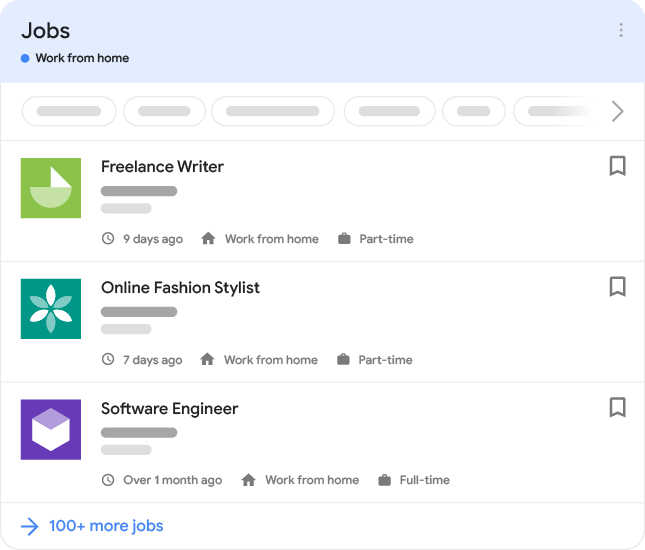
You can also try it out in Google Search:
search Work from home jobs
Feature availability: The actual appearance in search results might be different, and you may not see work from home jobs appearing in your region right away. To make your work from home jobs eligible for display in the feature, mark up your work from home jobs in advance.There are three properties that help Google understand which jobs can be performed from home:
- jobLocationType: Use this property to specify that the job is a Work from home job.
- applicantLocationRequirements: Use this property to specify geographic location(s) in which employees may be located for work from home jobs. At least one country is required.
- jobLocation: Use this property to specify where the job can be physically performed. You don't need to use this property if there isn't a physical location where a job can be performed (for example, an office or construction site). Note that the addressCountry property must be specified if this property is used.
Here are some common scenarios for work from home jobs:
- The job can be performed at home, but there are geographical restrictions for where the employee can be located. The employee doesn't have to go to a physical job location or office. Use applicantLocationRequirements and jobLocationType. "applicantLocationRequirements": { "@type": "Country", "name": "USA" }, "jobLocationType": "TELECOMMUTE"
- The job can be performed at a physical work site located in Detroit, MI, or at home in the US. Use jobLocation and jobLocationType. "jobLocation": { "@type": "Place", "address": { "@type": "PostalAddress", "addressLocality": "Detroit", "addressRegion": "MI", "addressCountry": "US" } }, "jobLocationType": "TELECOMMUTE"
- The job can be performed at a physical location in Detroit or at home in either Michigan or Texas. Use jobLocation, jobLocationType, and applicantLocationRequirements. "jobLocation": { "@type": "Place", "address": { "@type": "PostalAddress", "streetAddress": "555 Clancy St", "addressLocality": "Detroit", "addressRegion": "MI", "postalCode": "48201", "addressCountry": "US" } }, "applicantLocationRequirements": [{ "@type": "State", "name": "Michigan, USA" },{ "@type": "State", "name": "Texas, USA" }], "jobLocationType": "TELECOMMUTE"
Update your company logo
Google uses the same logo for your job postings as the image shown in your company's Knowledge Graph card. You can suggest a change if you prefer a different logo, or else indicate your preferred logo (for both your company's Google knowledge panel and its job postings) using structured data.
Note: In most cases, Google will review your request within a few days.If you have a third-party job site, you can provide a different logo for a given organization than the image shown in the organization's Google knowledge panel. Google will pick the best logo to display in Search results, whether it's the knowledge panel logo or the hiringOrganization logo. The logo property is only eligible to be shown on your job site, and isn't treated as the canonical logo for the organization. For more information, see hiringOrganization.
Technical guidelines
- Put structured data on the most detailed leaf page possible. Don't add structured data to pages intended to present a list of jobs (for example, search result pages). Instead, apply structured data to the most specific page describing a single job with its relevant details.
- Add a JobPosting property for each job posting that you want to advertise. The structured data must appear on the same page as the job description that job seekers can read in their browser.
- Most properties must only occur once in your job posting web page, unless the description specifically indicates that it can be added more than once.
If you choose to use sitemaps to keep Google informed of changes to job posting URLs, follow the general sitemap guidelines. In addition, the following sitemap guidelines apply to job posting URLs.
- Make sure Googlebot can access the URLs in the sitemap. Be sure that the URLs you include in the sitemap are not behind a firewall or disallowed by your robots.txt file.
- Use as accurate a time as possible for the <lastmod> (sitemap), <pubDate> (RSS), or <updated> (Atom) values to indicate when the page was added or changed. The value must be the last time that the content at the URL changed. It's important that you use accurate times; crawl bandwidth is limited and accurate times help us avoid re-crawling pages that haven't changed. In addition, the more Google has to crawl your pages, the more load will be placed on your servers.
- Don't include search results pages, list pages, or other dynamic pages in the sitemap.
- The URLs in the sitemap must include the canonical page for each job posting.
Job posting content policies
We created the job posting content policies to ensure that our users are connected with jobs that are open, relevant, and easy to apply to. The general structured data guidelines and spam policies for Google web search also apply to job postings. If we find content that violates these policies, we'll respond appropriately, which may include taking manual action and removing the job posting(s) from the job search experience on Google.
Irrelevant content
The JobPosting markup must only be used on pages that contain a single job posting. We don't allow the use of JobPosting markup in any other page, including pages that do not list any job.
Incomplete content
We don't allow job postings with incomplete job descriptions.
Misrepresentation
We don't allow job postings that attempt to impersonate another person or organization, or otherwise engage in activities intended to deceive, defraud, or mislead others. This includes falsely implying affiliation with, or endorsement by, another individual or organization. This also includes using multiple accounts to evade our policies, bypass blocks, or otherwise subvert restrictions placed on your account.
Policy violation examples include:
- Jobs or content that represent the employer in a way that is not accurate, realistic, or truthful.
- Jobs posting for fake or non-existent jobs. This includes job postings with the primary purpose of collecting information about applicants, rather than seeking to employ these applicants.
- Job titles, description, and other details that use keyword stuffing to manipulate search rankings.
- Providing false location data that does not match the actual location of the job.
- Job postings on behalf of an organization or company without authorization.
Profanity and vulgar language
We don't allow job postings that contain obscene, profane, or offensive language.
Advertisements disguised as a job posting
We don't allow promotional content disguised as a job posting, such as those posted by a third party (for example, affiliate programs).
Legal removal requests
If Google receives a complaint that content in a job posting may violate the law, the job posting will be handled in accordance with Search policies.
Expired job postings
We don't allow expired job postings. Ideally you should remove expired job postings from your website. If you prefer to not remove them, then you need to ensure the validThrough property is populated and in the past. This helps people review only the job postings that are still hiring.
Jobs without a way to apply
We don't allow job postings that don't have a way to apply. This includes:
- Job postings that advertise events such as career fair invitations.
- Job postings that require a login to view the job description. Users must be able to see the job posting details without the need to login.
Resume collection
Publishers may solicit resume collections for open positions only. We may remove solicitations that collect candidate data, but are not currently hiring.
Job requests
Job postings must describe the open position, include any qualifications needed, and include other information that would be relevant to a user looking for a job. We don't allow job postings where the job applicant is offering to perform a job.
Payment required
We don't allow job postings that require payment from applicants.
Editorial content
To ensure our users can understand your content and can easily apply for the job, we don't allow content that spams the page with obstructive text and images, excessive and distracting ads, or content that doesn't add any value to the job posting.
We don't allow grammatically incorrect content. Follow basic grammar rules that are applicable to your content's language or writing system (such as using proper capitalization, avoiding writing text in all caps), and only use acronyms or abbreviations that are widely understood.
Structured data type definitions
This section describes the structured data types related to job postings.
You must include the required properties for your content to be eligible for display in the job experience on Google Search. You can also include the recommended properties to add more information about your content, which could provide a better user experience.
JobPosting
The full definition of JobPosting is available at schema.org/JobPosting. The Google-supported properties are:
Required properties datePostedDate
The original date that employer posted the job in ISO 8601 format. For example, "2017-01-24" or "2017-01-24T19:33:17+00:00".
"datePosted": "2016-02-18" descriptionText
The full description of the job in HTML format.
The description must be a complete representation of the job, including job responsibilities, qualifications, skills, working hours, education requirements, and experience requirements. The description can't be the same as the title.
Additional guidelines:
- You must format the description in HTML.
- At minimum, add paragraph breaks using <br>, <p>, or n.
- The feature recognizes the following HTML tags: <p>, <ul>, and <li>.
- The feature doesn't recognize header and character-level tags, such as <h1>, <strong>, and <em>. While the tags won't affect the formatting in the feature, you can safely include them on the page.
Organization
The organization offering the job position. This must be the name of the company (for example, "Starbucks, Inc"), and not the specific location that is hiring (for example, "Starbucks on Main Street"). For example:
"hiringOrganization": { "@type": "Organization", "name": "MagsRUs Wheel Company", "sameAs": "http://www.magsruswheelcompany.com" }If the organization is hiring anonymously (for example, a staffing agency on behalf of an anonymous employer or an employer directly on your platform), use the confidential value for the hiringOrganization.name field. For example:
"hiringOrganization": { "@type": "Organization", "name": "confidential" }Logos on third-party job sites
If you have a third-party job site, you can provide a different logo for a given organization than the image shown in the organization's Google knowledge panel. To request a different logo for a hiring organization, add the logo property to the hiringOrganization array. For JobPosting structured data, the image width and height ratio must be between 0.75 and 2.5. Make sure that you follow the logo image guidelines and Company logo guidelines. For example: "hiringOrganization": { "@type": "Organization", "name": "MagsRUs Wheel Company", "sameAs": "http://www.magsruswheelcompany.com", "logo": "https://www.example.com/images/logo.png" }
jobLocationPlace
The physical location(s) of the business where the employee will report to work (such as an office or worksite), not the location where the job was posted. Include as many properties as possible. The more properties you provide, the higher quality the job posting is to our users. Note that you must include the addressCountry property. For example:
"jobLocation": { "@type": "Place", "address": { "@type": "PostalAddress", "streetAddress": "555 Clancy St", "addressLocality": "Detroit", "addressRegion": "MI", "postalCode": "48201", "addressCountry": "US" } }Multiple physical locations
If the job has multiple locations, add multiple jobLocation properties in an array. Google will choose the best location to display based on the job seeker's query.
Remote jobs
For jobs in which the employee may or must work remotely 100% of the time, you must use jobLocationType. The jobLocation property isn't required if applicantLocationRequirements is present.
titleText
The title of the job (not the title of the posting). For example, "Software Engineer" or "Barista". For example:
"title": "Software Engineer"Best practices:
- This property must be the title of the job only.
- Don't include job codes, addresses, dates, salaries, or company names in the title property.
Not recommended: Apply now for IT job -FRENCH speaker in Bucharest
Recommended: Market Specialist, French speaker
- Provide concise, readable titles.
- Don't overuse special characters such as ! and *. Abusing special characters might cause your structured data to be considered as Spammy Structured Markup. Numbers and characters such as / and - are acceptable.
Not recommended: *** WAREHOUSE HIRING NOW!! ON A BUS ROUTE!! ***
Recommended: Shipping and Receiving Warehouse Associate
- Don't use name instead of title. The properties title and name aren't interchangeable.
- If you're a third party job site, don't attempt to modify the job title to follow the guidelines, as it can make the title unreadable. Instead, provide the title as you received it from the employer.
AdministrativeArea
The geographic location(s) in which employees may be located for to be eligible for the Work from home job. The job description must clearly state that the applicant may be located in certain geographical location(s). This property is required if applicants may be located in one or more geographic locations and the job is 100% remote.
The following example suggests a job that can be done remotely anywhere within the United States:
"applicantLocationRequirements": { "@type": "Country", "name": "USA" }, "jobLocationType": "TELECOMMUTE"The following example suggests a job can either be done remotely from the country of Canada or executed at a physical location in Detroit, MI:
"jobLocation": { "@type": "Place", "address": { "@type": "PostalAddress", "streetAddress": "555 Clancy St", "addressLocality": "Detroit", "addressRegion": "MI", "postalCode": "48201", "addressCountry": "US" } }, "applicantLocationRequirements": { "@type": "Country", "name": "Canada" }, "jobLocationType": "TELECOMMUTE" baseSalaryMonetaryAmount
The actual base salary for the job, as provided by the employer (not an estimate). Note: Only employers can provide baseSalary.
For the unitText of QuantitativeValue, use one of the following case-sensitive values:
- HOUR
- DAY
- WEEK
- MONTH
- YEAR
For example:
"baseSalary": { "@type": "MonetaryAmount", "currency": "USD", "value": { "@type": "QuantitativeValue", "value": 40.00, "unitText": "HOUR" } }To specify a salary range, define a minValue and a maxValue, rather than a single value. For example:
"baseSalary": { "@type": "MonetaryAmount", "currency": "USD", "value": { "@type": "QuantitativeValue", "minValue": 40.00, "maxValue": 50.00, "unitText": "HOUR" } } directApplyBoolean
Indicates whether the URL that's associated with this job posting enables direct application for the job.
Since we are still developing how we are using this information, you may not see any appearance or effect in Google Search right away.We define a direct apply experience in terms of the actions that are required from the user to apply to the job. This means that a user is offered a short and simple application process on your page without unnecessary intermediate steps. If the user has to click apply, complete an application form, sign in or log in more than once in the application journey, it means that you aren't offering a direct apply experience.
You likely offer a direct apply experience if you provide one of the following experiences:
- The user completes the application process on your site.
- Once arriving at your page from Google, the user doesn't have to click apply and provide user information more than once to complete the application process
- The job posting includes instructions on how to apply (for example, the job posting lists the email address, phone number, or physical address where they can submit the application) or directly schedule an interview with an employer. These instructions must be for directly contacting the actual company hiring for the job, or their representative.
Text
Type of employment. For example:
"employmentType": "CONTRACTOR"Choose one or more of the following case-sensitive values:
- FULL_TIME: The job is a full-time position.
- PART_TIME: The job is a part-time position.
- CONTRACTOR: The job is a contractor position.
- TEMPORARY: The job is a temporary position.
- INTERN: The job is an internship position.
- VOLUNTEER: The job is a volunteer position.
- PER_DIEM: The job is paid by the day.
- OTHER: The job is a different type of position that's not covered by the other possible values.
You can include more than one employmentType property. For example:
"employmentType": ["FULL_TIME", "CONTRACTOR"] identifierPropertyValue
The hiring organization's unique identifier for the job.
For example:
"identifier": { "@type": "PropertyValue", "name": "MagsRUs Wheel Company", "value": "1234567" } jobLocationTypeText
Set this property with the value TELECOMMUTE for jobs in which the employee may or must work remotely 100% of the time (from home or another location of their choosing). In addition to adding jobLocationType, the job description must clearly state that the job is 100% remote. The jobLocationType property is required if the job is 100% remote.
Requirements
- Jobs marked as TELECOMMUTE must be fully remote. Don't mark up jobs that allow occasional work-from-home, jobs for which remote work is a negotiable benefit, or have other arrangements that are not 100% remote. The "gig economy" nature of a job doesn't imply that it is or is not remote.
- You must specify a minimum of one country from which applicants are eligible to work, using applicantLocationRequirements (preferred), or a default to the country of a jobLocation (provided there is an option to work at a physical location as well). If a remote job doesn't contain applicantLocationRequirements, Google shows the job to anyone in the country specified in jobLocation.
The following example shows that the employee can physically report to work at a job site located in Tucson, AZ OR can work remotely within the US:
"jobLocation": { "@type": "Place", "address": { "@type": "PostalAddress", "addressLocality": "Tucson", "addressRegion": "AZ", "addressCountry": "US" } }, "jobLocationType": "TELECOMMUTE" Google continues to support TELECOMMUTE as an additionalProperty of jobLocation. While we don't have immediate plans to deprecate additionalProperty, we encourage the use of the new schema where possible. validThroughDateTime
Note: This is required for job postings that have an expiration date.The date when the job posting will expire in ISO 8601 format. For example, "2017-02-24" or "2017-02-24T19:33:17+00:00". For example:
"validThrough": "2017-03-18T00:00"If a job posting never expires, or you do not know when the job will expire, do not include this property. If the job is filled before the expiration date occurs, remove the job posting.
Education and experience properties (beta)
In addition to the recommended JobPosting properties, you can add the following beta properties to add more information about the education and experience of a job posting. Since we are still developing how we are using this information, you may not see any appearance or effect in Google Search right away.
Here's an example of a job posting that requires a bachelor's degree and three years of experience.
<html> <head> <title>Software Engineer</title> <script type="application/ld+json"> { "@context" : "https://schema.org/", "@type" : "JobPosting", "title" : "Software Engineer", "educationRequirements" : { "@type" : "EducationalOccupationalCredential", "credentialCategory" : "bachelor degree" }, "experienceRequirements" : { "@type" : "OccupationalExperienceRequirements", "monthsOfExperience" : "36" }, "description" : "<p>Google aspires to be an organization that reflects the globally diverse audience that our products and technology serve. We believe that in addition to hiring the best talent, a diversity of perspectives, ideas and cultures leads to the creation of better products and services.</p>", "identifier": { "@type": "PropertyValue", "name": "Google", "value": "1234567" }, "datePosted" : "2024-01-18", "validThrough" : "2024-03-18T00:00", "employmentType" : "CONTRACTOR", "hiringOrganization" : { "@type" : "Organization", "name" : "Google", "sameAs" : "https://www.google.com", "logo" : "https://www.example.com/images/logo.png" }, "jobLocation": { "@type": "Place", "address": { "@type": "PostalAddress", "streetAddress": "1600 Amphitheatre Pkwy", "addressLocality": ", Mountain View", "addressRegion": "CA", "postalCode": "94043", "addressCountry": "US" } }, "baseSalary": { "@type": "MonetaryAmount", "currency": "USD", "value": { "@type": "QuantitativeValue", "value": 40.00, "unitText": "HOUR" } } } </script> </head> <body> </body> </html> <html> <head> <title>Software Engineer</title> <script type="application/ld+json"> { "@context" : "https://schema.org/", "@type" : "JobPosting", "title" : "Software Engineer", "educationRequirements" : { "@type" : "EducationalOccupationalCredential", "credentialCategory" : "bachelor degree" }, "experienceRequirements" : { "@type" : "OccupationalExperienceRequirements", "monthsOfExperience" : "36" }, "description" : "<p>Google aspires to be an organization that reflects the globally diverse audience that our products and technology serve. We believe that in addition to hiring the best talent, a diversity of perspectives, ideas and cultures leads to the creation of better products and services.</p>", "identifier": { "@type": "PropertyValue", "name": "Google", "value": "1234567" }, "datePosted" : "2024-01-18", "validThrough" : "2024-03-18T00:00", "employmentType" : "CONTRACTOR", "hiringOrganization" : { "@type" : "Organization", "name" : "Google", "sameAs" : "https://www.google.com", "logo" : "https://www.example.com/images/logo.png" }, "jobLocation": { "@type": "Place", "address": { "@type": "PostalAddress", "streetAddress": "1600 Amphitheatre Pkwy", "addressLocality": ", Mountain View", "addressRegion": "CA", "postalCode": "94043", "addressCountry": "US" } }, "baseSalary": { "@type": "MonetaryAmount", "currency": "USD", "value": { "@type": "QuantitativeValue", "value": 40.00, "unitText": "HOUR" } } } </script> </head> <body> </body> </html> Recommended properties (beta) educationRequirementsEducationalOccupationalCredential or Text
The educational background needed for the job posting. If there aren't any educational requirements, use the no requirements value. If you don't know the educational requirements, don't add this property.
This property can be repeated in an array. For example:
"educationRequirements": [ { "@type": "EducationalOccupationalCredential", "credentialCategory": "bachelor degree" }, { "@type": "EducationalOccupationalCredential", "credentialCategory": "postgraduate degree" } ] educationRequirements.credentialCategoryText
The level of education that's required for the job posting. Use one of the following values:
- high school: The job requires high school education.
- associate degree: The job requires an associate degree.
- bachelor degree: The job requires a bachelor degree.
- professional certificate: The job requires a professional certificate.
- postgraduate degree: The job requires a postgraduate degree.
In addition to adding this property, continue to describe the education requirements in the description property.
experienceRequirementsOccupationalExperienceRequirements or Text
The experience that's required for the job posting. If there aren't any requirements, use the no requirements value.
In addition to adding this property, continue to describe the experience requirements in the description property.
experienceRequirements.monthsOfExperienceNumber
The minimum number of months of experience that are required for the job posting.
If there are more complex experience requirements, use the experience that represents the minimum number that is required for a candidate. For example:
- 12 months as a chef or 24 months as a sous chef: This implies that the candidate may have either experience of the two required options, and the minimum requirement is 12 months.
- 12 months as a chef and 24 months as a sous chef: This is implies that the candidate has to fulfill all given requirements, and the minimum requirement is 24 months.
Boolean
If set to true, this property indicates whether a job posting will accept experience in place of its formal educational qualifications. If set to true, you must include both the experienceRequirements and educationRequirements properties.
Troubleshooting
If you're having trouble implementing or debugging structured data, here are some resources that may help you.
- If you're using a content management system (CMS) or someone else is taking care of your site, ask them to help you. Make sure to forward any Search Console message that details the issue to them.
- Google does not guarantee that features that consume structured data will show up in search results. For a list of common reasons why Google may not show your content in a rich result, see the General Structured Data Guidelines.
- You might have an error in your structured data. Check the list of structured data errors and the Unparsable structured data report.
- If you received a structured data manual action against your page, the structured data on the page will be ignored (although the page can still appear in Google Search results). To fix structured data issues, use the Manual Actions report.
- Review the guidelines again to identify if your content isn't compliant with the guidelines. The problem can be caused by either spammy content or spammy markup usage. However, the issue may not be a syntax issue, and so the Rich Results Test won't be able to identify these issues.
- Troubleshoot missing rich results / drop in total rich results.
- Allow time for re-crawling and re-indexing. Remember that it may take several days after publishing a page for Google to find and crawl it. For general questions about crawling and indexing, check the Google Search crawling and indexing FAQ.
- Post a question in the Google Search Central forum.
If your job posting isn't appearing in the job search results or if you've received a manual action for Spammy Structured Markup in Search Console, try to resolve the most common issues. If you're still experiencing issues, make sure you review our guidelines.
Structured data is on the wrong page
error What caused the issue: A job listing page (a search results page that contains one or more job postings) has JobPosting structured data on the page. JobPosting structured data must only be on a job posting page (a page that contains a single job and isn't a search results page). You may have received the Search Console message: "Structured data policy violation - A list page should not include structured data for individual jobs".
done Fix the issue
- Remove JobPosting structured data from the listing page. Only place JobPosting structured data on pages that are dedicated to a single job posting.
- After you resolve the issue, submit your site for reconsideration.
Content doesn't match the structured data
error What caused the issue: A page includes content that doesn't match the structured data on the page. For example, the title of a job on the page doesn't match the value listed for the title property. There may also be spammy content, like click-baity titles and descriptions, the job seems to be fake, or the job posting isn't representative of the actual job.
Another example is when the job salary is in the markup but not on the job page. This is also a violation of the content guidelines, as all information in the markup must be visible on the job page.
For a full list of examples, see the examples in our content policies. You may have received this Search Console message: "Structured data policy violation - Content on pages found to be different than structured data on the page".
done Fix the issue
- Verify that the structured data aligns with the actual content on the page, is representative of the job to be performed, and doesn't mislead users.
- Use the URL Inspection tool to make sure that the content is visible on the rendered page (the rendered page is how Google sees your page).
- After you resolve the issue, submit your site for reconsideration.
Expired jobs are still live
error What caused the issue: Users can still access the page through the jobs experience on Google even though the job has expired. Usually, this is because of the following reasons:
- The validThrough property is missing or isn't set to the past.
- The page is still live.
- The job posting's apply option flow directs to an expired job posting page.
- JobPosting structured data is still present on the page even though the job has expired.
You may have received this Search Console message: "Structured data policy violation - JobPosting structured data on expired job".
done Fix the issue
- Remove the expired job posting by doing one of the following:
- Ensure the validThrough property is populated and in the past.
- Remove the page entirely (so that requesting it returns a 404 or 410 status code).
- Remove JobPosting structured data from the page.
- Keep Google informed by using the Indexing API. For job posting URLs, we recommend using the Indexing API instead of sitemaps because the Indexing API prompts Googlebot to crawl your page sooner than removing the URL from the sitemap. However, we still recommend submitting a sitemap for coverage of your entire site.
- After you resolve the issue, submit your site for reconsideration.
Apply option is missing
error What caused the issue: There's no way for the user to apply for the job on the job posting page. You may have received this Search Console message: "Structured data policy violation - Can't submit application on job offer page."
done Fix the issue
- Make sure there's a way for users to apply for the job on the page.
- After you resolve the issue, submit your site for reconsideration.
Logo is incorrect
error What caused the issue: Your site doesn't have a Google knowledge panel or the knowledge panel shows an incorrect logo for your site. Google uses the same logo for your job postings as the image shown in your company's knowledge panel card. For more information about how Google selects your logo, see Update your company logo.
done Fix the issue
There are two ways you can fix the issue:
- Make sure you specify the correct logo with the hiringOrganization.logo property. Make sure that the image width and height ratio is between 0.75 and 2.5. Updating the structured data is faster than updating the Google knowledge panel and doesn't require you to be verified for your knowledge panel.
- Suggest a change to your knowledge panel. Updating your knowledge panel provides more control over how your organization appears on Google, but it may take longer to update. If you need to fix a logo issue quickly, add the hiringOrganization.logo property.
Job location is missing or incorrect
error What caused the issue: Google doesn't understand the value(s) provided for the jobLocation, addressLocality, or addressRegion properties. Google tries to match the location information to a physical location, and the location provided is either missing or incorrect.
done Fix the issue
- Make sure the structured data includes values for jobLocation, addressLocality, or addressRegion (depending on the location, not all of the location properties are applicable). We recommend that you include as many location properties as possible. The more properties you provide, the higher quality the job posting is to users.
- Validate the location fix:
- Open the Rich Results Test.
- Enter the job posting URL in the Fetch URL box.
- Click Validate.
- Click Preview.
Success: The Rich Results Test displays the correct job location in the Google Search Preview Tool.
Try again: The Rich Results Test displays "false" for the job location in the Google Search Preview Tool. Make sure the location is a real location.
Monitor rich results with Search Console
Search Console is a tool that helps you monitor how your pages perform in Google Search. You don't have to sign up for Search Console to be included in Google Search results, but it can help you understand and improve how Google sees your site. We recommend checking Search Console in the following cases:
- After deploying structured data for the first time
- After releasing new templates or updating your code
- Analyzing traffic periodically
After deploying structured data for the first time
After Google has indexed your pages, look for issues using the relevant Rich result status report. Ideally, there will be an increase of valid items, and no increase in invalid items. If you find issues in your structured data:
- Fix the invalid items.
- Inspect a live URL to check if the issue persists.
- Request validation using the status report.
After releasing new templates or updating your code
When you make significant changes to your website, monitor for increases in structured data invalid items.- If you see an increase in invalid items, perhaps you rolled out a new template that doesn't work, or your site interacts with the existing template in a new and bad way.
- If you see a decrease in valid items (not matched by an increase in invalid items), perhaps you are no longer embedding structured data in your pages. Use the URL Inspection tool to learn what is causing the issue.
Analyzing traffic periodically
Analyze your Google Search traffic using the Performance Report. The data will show you how often your page appears as a rich result in Search, how often users click on it and what is the average position you appear on search results. You can also automatically pull these results with the Search Console API.Use custom UTM parameters in Google Analytics
Use our custom UTM parameters to track visits after a user is directed from the job detailed page to your site. You can use the parameters with Google Analytics or other third-party tracking tools:
utm_campaign=google_jobs_apply utm_source=google_jobs_apply utm_medium=organicIf you're experiencing unexpected fluctuations or inconsistencies in your traffic, use the troubleshooter to identify and resolve the issues.
Region availability
We are excited to bring the job search experience on Google to more regions around the world. The experience is currently available in the following regions.
- Asia: Available in the following countries:
- Bangladesh
- Hong Kong
- India
- Indonesia
- Japan
- Kazakhstan
- Kyrgyzstan
- Malaysia
- Pakistan
- Philippines
- Singapore
- Sri Lanka
- Taiwan
- Thailand
- Uzbekistan
- Vietnam
- Europe: Available in the following countries:
- Austria
- Belarus
- Belgium
- Denmark
- France
- Germany
- Greece
- Italy
- Netherlands
- Portugal
- Russia
- Spain
- Switzerland
- United Kingdom
- Latin America: Available in the entire region
- Middle East and North Africa: Available in the following countries:
- Algeria
- Bahrain
- Egypt
- Iraq
- Jordan
- Kuwait
- Lebanon
- Libya
- Morocco
- Oman
- Palestine
- Qatar
- Saudi Arabia
- Tunisia
- United Arab Emirates
- North America: Available in the entire region
- Sub-Saharan Africa: Available in the entire region
Link nội dung: https://career.edu.vn/tuyen-dung-google-a77564.html